

This guide is in English for now. The tool itself works in your language.
Salary Slip › Help › Making it
How to make a salary slip
A salary slip shows what an employee earned in the month, what was deducted and the net pay. The maker can work out PF, ESI, professional tax and TDS for you.
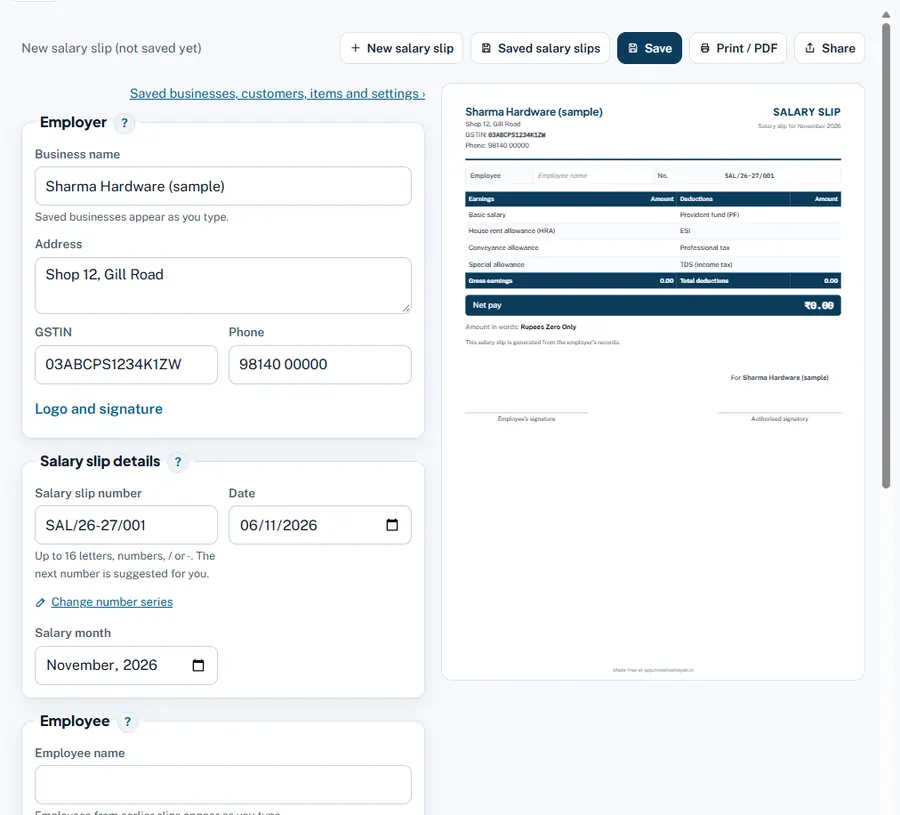
Step by step
- Salary slip details. Number, Date and Salary month.
- Employee. Employee name, Employee code, Designation, Department, Date of joining, PAN, UAN (PF number), ESI number.
- Attendance. Days in the month and Paid days.
- Earnings and deductions. Add lines with Add earning and Add deduction (Basic, HRA, allowances; advances).
- Work out PF, ESI, professional tax and TDS. Choose Employee's income tax regime (New regime is the default), then press the button: PF, ESI, professional tax (for supported states) and monthly TDS fill in.
- Save and share. Net pay is printed in figures and words.
Worked example
An employee in Maharashtra, October 2026, 31 paid days: Basic ₹12,000, HRA ₹4,800, other allowance ₹2,200 = gross ₹19,000.
| PF 12% of basic ₹12,000 | ₹1,440 |
| ESI 0.75% of ₹19,000 (gross is within ₹21,000) | ₹143 |
| Professional tax (Maharashtra, above ₹10,000) | ₹200 |
| TDS (new regime, yearly income far below ₹12 lakh) | ₹0 |
| Net pay | ₹17,217 |
Rules and dates
EPF: 12% of basic + DA up to the wage ceiling of ₹25,000 a month (from 17 September 2026). ESI applies to employees earning up to ₹21,000 a month (0.75% employee, 3.25% employer). New tax regime FY 2026-27: no tax up to ₹12 lakh income (₹12.75 lakh for salaried with the ₹75,000 standard deduction).
Common mistakes and how to fix them
- Basic below half of gross. Under the labour codes, wages for PF and gratuity cannot be less than half of the total pay; the maker shows a hint.
Try it now: it is free and needs no login.Open the salary slip maker